The Plain-Language Myth: Shorter Forms Are Not Always Clearer
Plain-language forms are easier to complete when labels, question groups and explanations clarify each decision, not merely when the word count falls.
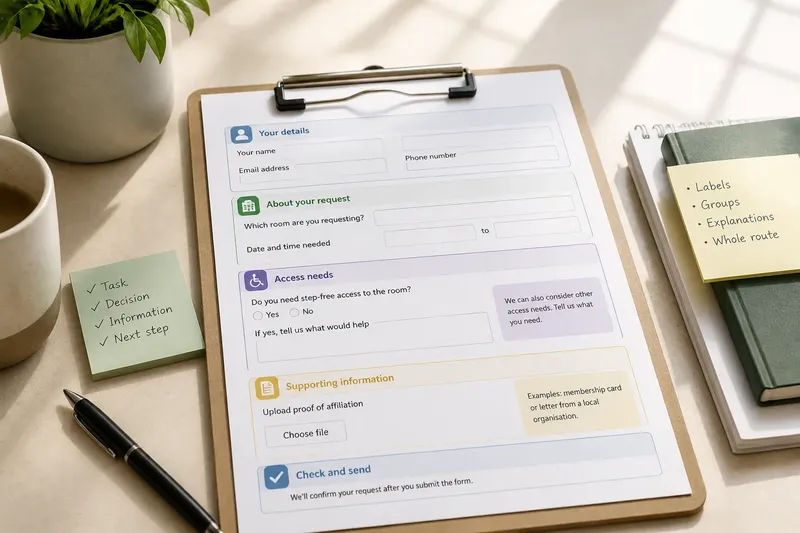
The common mistake with plain-language forms is to treat every deleted word as a gain. Cut too far and a form may become shorter but harder to complete: people have to guess what a label means, which questions belong together, or what a term will affect. Clear communication depends on the decisions a form asks someone to make, not simply on its length.
A form for a shared service might ask about eligibility, access needs and contact details. Each question needs enough context for a person to give the right answer without making them search elsewhere. The practical task is to remove unnecessary effort while keeping the information that makes a decision understandable.
Start with the task
Before editing, write down what the person is trying to do and what the service needs to decide. Is the person requesting a room, registering for a shared resource, or asking for an adjustment? Then identify what staff need from each answer and what happens after submission.
This gives you a way to judge every phrase. A sentence that explains why an access question is asked may be useful; a repeated welcome message may not be. Do not start by applying a word limit. Start by tracing the path from the person’s intention to the service’s next action.
If you are revising an existing form, gather the questions, instructions and any messages shown after submission. Include the surrounding service information that people must consult to answer. A form cannot be judged in isolation if it depends on a separate eligibility page or a conversation at a desk.
Map each decision
For each question, note the decision a person must make, the answer the service needs and any term that could be interpreted in more than one way. A label such as “requirements” might refer to proof of eligibility, equipment, or a person’s access needs. Naming the specific subject prevents the reader from having to infer it.
Use ordinary words where they preserve the meaning. If a formal term is necessary because it appears in service rules, explain it beside the question rather than replacing it with a vague substitute. The aim is not to make every sentence conversational; it is to make the choice and its consequences legible.
Imagine a community room form asks, “Special arrangements?” A person who needs step-free access might not know whether the question is for equipment, catering or room set-up. Replacing it with “Do you need step-free access to the room?” makes the subject clear; a nearby note can invite other access requests if the service can consider them.
Group related questions
Arrange questions into small groups that match the task’s natural decisions. Contact details belong together; information about a requested resource belongs together; access requests should be easy to locate. A clear heading tells the person what the following questions concern and helps them return to a section without rereading the whole form.
Grouping is not the same as making large blocks. If a section mixes eligibility, payment arrangements and access needs under a broad heading such as “About your request”, the reader still has to work out which question serves which purpose. Use specific headings, and split a group when its questions ask for distinctly different kinds of information.
- Put questions that support the same decision together.
- Give each group a heading that names its subject.
- Place supporting instructions beside the questions they explain.
- Keep optional information visibly separate from information needed to process the request.
As with items in a drawer, grouping helps only if the contents have a clear place. A heading such as “Access needs” is more useful than “Other details” when the questions concern reaching and using a shared facility.
Place explanations nearby
An explanation helps most at the point where someone must act on it. If a person has to decide whether to provide a particular document, explain what counts beside that request. If a question uses a service term, define it before or directly after the question, not in a distant glossary that interrupts the task.
Keep explanations focused on the decision. Say what information is requested, why it is needed where that context helps, and what the person should do if the situation does not fit the options. Avoid adding a long account of internal procedures that does not help someone answer.
Say you are editing a library room-booking form and it asks for “proof of affiliation”. If the service accepts a membership card or a letter from a local organisation, name those options beside the upload field. A person can then choose an appropriate document without guessing from the label or leaving the form to seek clarification.
Choose labels carefully
Labels should identify the information requested, not merely signal that an answer is expected. “Name” may be enough for a familiar field, but a service may need to distinguish the person making the request from the person who will use a resource. “Your name” and “Name of the person using the room” make those roles clearer.
Instructions should also distinguish between required and optional answers. If a person may leave a question blank, say so near that question. If an answer is required, explain the reason when it is not obvious. Avoid relying on colour or a small symbol alone to convey whether a field is mandatory.
For choices, describe the options in terms a person can recognise. If none fits, provide a suitable route to explain the situation, provided the service can review it. A forced choice that does not reflect real circumstances can produce an inaccurate answer even when the form is brief.
Check the whole route
Read the form from the perspective of someone completing it, rather than editing one sentence at a time. For each question, ask: can the person tell what is being requested, what answer fits, and what to do if none fits? Then check that the next question follows naturally from the one before it.
Review headings, labels, examples, error messages and the confirmation shown after submission. An unclear message at the end can leave someone unsure whether the request was received, even if the questions were easy to answer. If the form sends the person to another service page, make the purpose of that link clear.
Where possible, ask people who use the service to read the form and describe what they think each question means. Notice where they pause, ask for help or interpret a term differently from the service team. That feedback can identify wording that seems obvious internally but is ambiguous to someone encountering the process for the first time.
Questions readers ask?
Does plain language mean removing service terms?
Remove jargon when an ordinary word carries the same meaning. If an official term is necessary, keep it and explain it beside the decision it affects.
Should every explanation be on the form?
Include explanations people need to answer accurately. Keep background details elsewhere when they do not affect the choice, but make any relevant supporting information easy to reach.
How can I tell whether a question is too vague?
Ask what different answers a reader might reasonably give. If people could interpret the same label as asking about different things, make the subject or intended answer more specific.
What if a form must stay short?
Prioritise the words that clarify choices, required information and next actions. Remove repeated wording and irrelevant detail before deleting context that helps someone answer correctly.
Revise for clarity
When you review a plain-language form, begin with the person’s task, map the decisions, group related questions and place explanations beside the choices they support. Then check labels and read the entire route for gaps. This approach may not produce the shortest form, but it can make each question easier to understand and answer.
A useful edit leaves the person with less guessing, not merely fewer words to read. When a sentence explains a choice or tells someone what to do next, its value is measured by the clarity it provides.